External & floating IPs
Kube-DC provides two address resources for Project egress and inbound access:
- External IP (EIP): a cloud-internal or public address that can back a Project gateway or LoadBalancer Service
- Floating IP (FIP): a 1:1 NAT mapping between an external address and a specific VM or Pod
Floating IP client allowlists require a qualified installation with the
operator's FIP source-policy capability enabled. The capability is disabled
by default; restrictive spec.allowedCIDRs values are rejected while disabled.
Omitted, empty, or 0.0.0.0/0 leaves the FIP open to all IPv4 sources. Confirm
availability with your platform operator before using a restrictive list.
A qualified EIP-backed LoadBalancer Service also supports
spec.loadBalancerSourceRanges for selected TCP/UDP ports.
Manage IPs in the console
The Networking section in the Console UI shows all IP resources in your project:
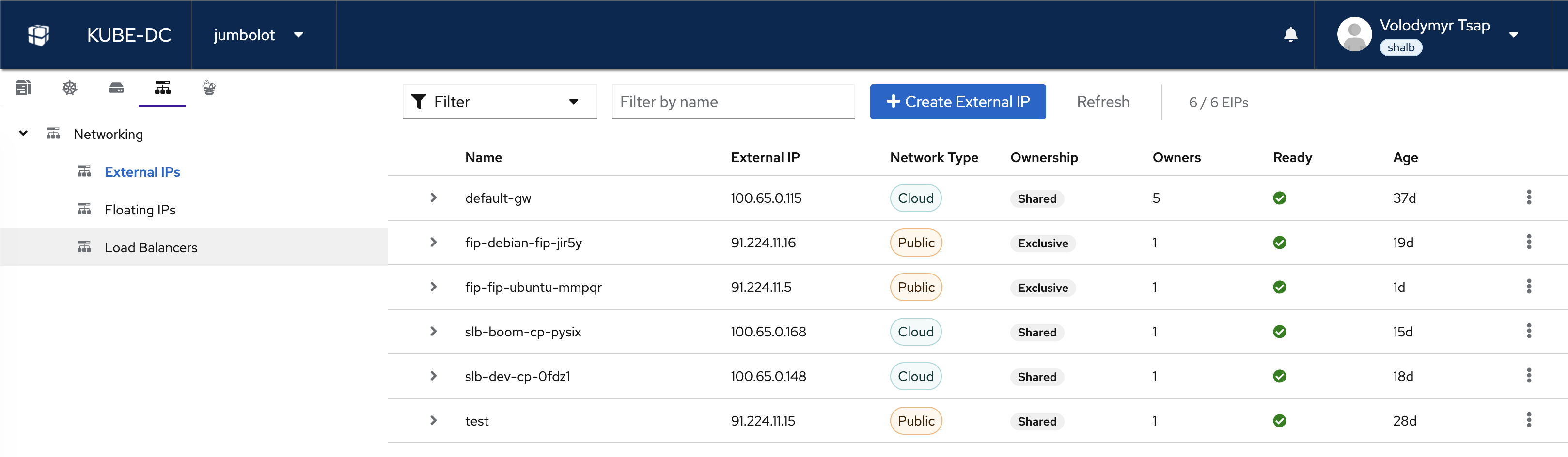
From here you can:
- View all External IPs with their network type (Cloud/Public), ownership, and status
- View and manage Floating IPs and their VM mappings
- View Load Balancers and their endpoints
- Click + Create External IP to allocate a new EIP
External IPs (EIPs)
Every project gets a default gateway EIP (default-gw) automatically. This EIP handles:
- Outbound NAT for all VMs and pods
- Default endpoint for LoadBalancer services (in public projects)
EIP network types
externalNetworkType | Description | Use Case |
|---|---|---|
cloud | Private address allocated from the platform's shared cloud pool; not internet-routable | Outbound NAT and private platform routing |
public | Public address allocated to this EIP; internet-routable where provider policy allows | Direct access, VMs, static IP |
"Shared pool" describes where a cloud address is allocated from; it does not mean multiple Projects use the same allocated address at the same time. Each EIp owns one allocation until the resource is deleted.
Create an EIP
apiVersion: kube-dc.com/v1
kind: EIp
metadata:
  name: my-eip
spec:
  externalNetworkType: public
kubectl apply -f eip.yaml
kubectl get eip
NAME         EXTERNAL IP      READY   AGE
default-gw   100.65.0.115     true    37d
my-eip       198.51.100.20     true    5s
Bind an EIP to a LoadBalancer Service
apiVersion: v1
kind: Service
metadata:
  name: my-service
  annotations:
    service.nlb.kube-dc.com/bind-on-eip: "my-eip"
spec:
  type: LoadBalancer
  selector:
    app: my-app
  ports:
  - port: 443
    targetPort: 443
Use the default Gateway EIP
For projects with egressNetworkType: public, the default gateway EIP is public and can be shared across services:
annotations:
  service.nlb.kube-dc.com/bind-on-default-gw-eip: "true"
In cloud Projects (egressNetworkType: cloud), the default gateway receives a private address from the shared cloud pool. That address belongs to the Project while the EIP exists, but it is not publicly routable. Create a public EIP and use bind-on-eip for direct inbound access.
Delete an EIP
kubectl delete eip my-eip
Deleting an EIP that is bound to a service or FIP will disrupt connectivity. Remove the binding first.
Floating IPs (FIPs)
Floating IPs provide 1:1 NAT between an external IP and a VM's internal IP. All ports are mapped, while the guest keeps its private address.
When to use FIPs
- Direct VM access: SSH, RDP, or another inbound protocol
- All-port mapping: appliances or services that need more ports than a practical LoadBalancer definition
- Service-free setup: point the FIP at a VM without creating a LoadBalancer Service
Create a FIP for a VM
The FIP uses vmTarget to automatically resolve the VM's internal IP through the QEMU guest agent:
apiVersion: kube-dc.com/v1
kind: FIp
metadata:
  name: ubuntu-fip
spec:
  externalNetworkType: public
  vmTarget:
    vmName: ubuntu
    interfaceName: vpc_net_0
kubectl apply -f fip.yaml
kubectl get fip
NAME          TARGET IP    EXTERNAL IP    VM       INTERFACE   READY
ubuntu-fip    10.0.0.153   198.51.100.5    ubuntu   vpc_net_0   true
Now SSH directly to the VM:
ssh ubuntu@198.51.100.5
When using externalNetworkType: public, a dedicated public EIP is automatically allocated and bound to the FIP. You don't need to create an EIP separately.
Restrict Floating IP clients
On an installation qualified for your FIP topology, add a list to the existing FIP manifest:
spec:
  allowedCIDRs:
    - 198.51.100.7/32
Use up to 32 IPv4 CIDRs. Removing the field or submitting [] requests open
access. Wait for a current-generation Ready condition with
status.sourcePolicySpecHash and status.sourcePolicyRevision, then verify
from allowed and denied source addresses. A generic Ready boolean alone does
not attest the source policy. Restrictive changes fail closed when the
controller cannot verify the required ACL, NAT and chassis barrier.
Restricted FIPs require an exclusive EIP and a target inside the owning Project. A router-interface address cannot serve the required restricted DNAT path. VM interface changes, migration, ICMP and return traffic require topology-specific qualification. Check operator availability rather than inferring support from schema presence. Quota addons increase allocation entitlement; they do not add addresses to a full routed pool.
Delete a FIP
kubectl delete fip ubuntu-fip
The auto-allocated EIP is released automatically.
FIP and LoadBalancer conflict
A VM/pod cannot simultaneously be:
- A target for a public FIP
- A backend for a cloud-network LoadBalancer service
Public FIPs create source-based policy routes that redirect ALL outbound traffic from that IP to the public gateway, breaking cloud-network LoadBalancer services.
Workarounds:
- Use separate pods/VMs for FIP targets and cloud-service backends
- Use the same network type for both (all public or all cloud)
- Choose one exposure method per VM/pod
Quick reference
| Task | Resource | Key Field |
|---|---|---|
| Get a public IP | EIp | externalNetworkType: public |
| Bind IP to service | Service annotation | bind-on-eip: "eip-name" |
| Use shared project IP | Service annotation | bind-on-default-gw-eip: "true" |
| Map IP directly to VM | FIp | vmTarget.vmName: "my-vm" |
| Auto HTTPS with cert | Service annotation | expose-route: "https" |
Next steps
- VPC and private networking: Project isolation and subnets
- Service exposure: Complete reference for Gateway Routes, LoadBalancers, and advanced options