How networking works
This page explains how Kube-DC networking works: how your Project connects to the internet, how traffic flows, and which tools expose your services.
Key concepts
| Resource | What It Does |
|---|---|
| VPC | Isolated virtual network for your Project. Every VM and pod gets a private IP here |
| Subnet | Private IP range chosen for the Project when it is created |
| EIP (External IP) | Cloud-internal or public address used by a Project gateway or LoadBalancer Service |
| FIP (Floating IP) | One-to-one NAT mapping from an external address to a VM or another selected internal IP |
| LoadBalancer | Kubernetes Service that routes external traffic to pods or VMs through an EIP |
| Gateway Route | HTTP or HTTPS route through the shared Envoy Gateway; HTTPS uses a configured Project Issuer |
| Routed Network | Organization-authorized L3 routes from the whole Project VPC to approved external destinations; Internet remains unchanged |
Project network types
A Project selects the address pool for its default gateway when it is created. Both network types keep workloads on private Project addresses and use source NAT (SNAT) for outbound traffic. The choice does not, by itself, expose a workload.
Cloud network (egressNetworkType: cloud)
- The default gateway receives an internal cloud address.
- Internet-bound traffic continues through platform upstream networking.
- The gateway address is not directly reachable from the public internet.
- Use a Gateway Route, or allocate a public EIP or FIP when your provider and quota allow it.
Public network (egressNetworkType: public)
- The default gateway receives an internet-routable address.
- Outbound traffic is SNATed to that address.
- Inbound traffic still requires an explicit Gateway Route, LoadBalancer Service, or FIP and remains subject to platform and workload policy.
Comparison
| Feature | Cloud | Public |
|---|---|---|
| Default gateway address | Cloud-internal | Internet-routable |
| Outbound internet through SNAT | Yes | Yes |
| Gateway Routes | Supported | Supported |
| LoadBalancer Services and FIPs | Subject to provider configuration and quota | Subject to provider configuration and quota |
How traffic flows
Outbound (VM/Pod → internet)
Every Project has a default EIP for outbound SNAT. Internet access remains subject to platform egress policy and upstream availability.
Routed network (Project VPC → approved remote network)
An Organization-authorized attachment applies to the whole Project VPC. Only approved destinations use the managed BGP path; ordinary Internet traffic continues through the existing Project gateway.
Inbound through Gateway route (HTTPS)
One shared Envoy Gateway handles HTTPS traffic. By default, each Service receives a hostname in the form <service>-<workload-namespace>.<base-domain>. Before creating an HTTPS route, create the namespaced letsencrypt
Issuer described in Service exposure.
Inbound through EIP + LoadBalancer
The EIP is bound to a LoadBalancer Service and supports any declared TCP or UDP service port.
Inbound through floating IP
A FIP maps an external address to a VM or selected internal IP. Reachability remains subject to platform controls and the guest or workload firewall.
The Floating IP belongs to Project production in Organization acme. Its
resource is stored in the Project's acme-production backing namespace, while
the public address remains mapped at the platform edge rather than configured
inside the guest.
Network MTU (1400)
Kube-DC Cloud Project networks use an encapsulated overlay, so the usable MTU inside a project is 1400 bytes, not the 1500 you may be used to. Kube-DC configures your VMs and pods with this value. A VM's interface picks up 1400 over DHCP, and pods get it from the network plugin. You normally never need to think about it.
Self-managed installations may use a different overlay MTU. Check the workload interface with ip link show and use your installation's actual value before hard-coding runtime settings.
The exception is software that assumes 1500 and does not inherit the MTU from its host. Docker is the most common case. If you install Docker inside a VM, Docker creates its default bridge with an MTU of 1500. Containers on that bridge then send packets too large for the 1400 network, and those packets are silently dropped.
This produces a distinctive failure: small requests succeed, large transfers hang and then fail.
# Succeeds: a small response fits
RUN curl -v https://github.com/example/repo

# Fails: bulk data does not
RUN git clone --depth 1 https://github.com/example/repo /src
  error: RPC failed; curl 56 Recv failure: Connection reset by peer
  fatal: expected flush after ref listing
It looks like a broken network, but connectivity is fine. Only the oversized packets are lost. docker pull, apt-get, and npm install can fail the same way.
Which side is at fault?
Run the failing command directly on the VM, outside Docker:
| Result | Cause | Fix |
|---|---|---|
| Works on the VM, fails in Docker | Docker's container MTU | See Fix: set Docker's MTU |
| Fails on the VM too | The VM's own interface | Run ip link show. It must report mtu 1400 |
Fix: set Docker's MTU
Create or edit /etc/docker/daemon.json inside the VM:
{
  "mtu": 1400
}
Then restart Docker:
sudo systemctl restart docker
Verify a container now gets the right MTU:
# Should print 1400. Before the fix it prints 1500.
docker run --rm alpine ip link show eth0

# The VM itself should already show 1400
ip link show
If you build with BuildKit or docker buildx, recreate the builder after you change the daemon config, so that it picks up the new MTU. As an alternative, build with --network=host, so that the build steps use the VM's interface directly.
Other container runtimes take the same setting: Podman uses mtu in its network config, and standalone containerd/CNI sets it in the bridge plugin config.
Manage networking in the console
The Console UI provides a Networking section with three tabs for managing network resources:
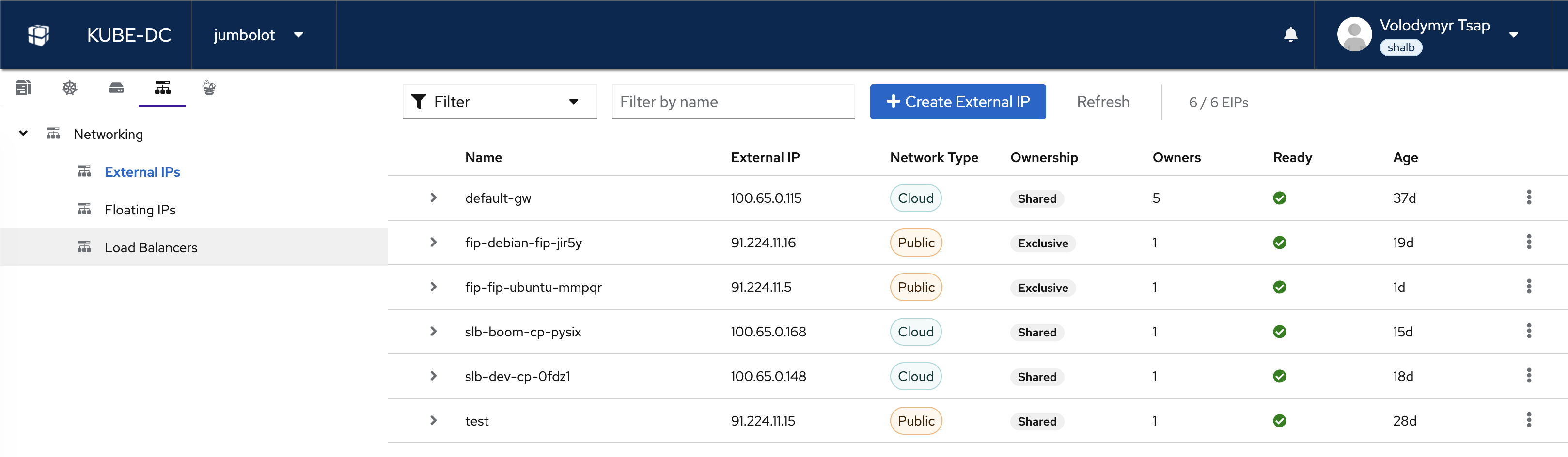
- External IPs: view and create EIPs, see network type (Cloud/Public), ownership, and status
- Floating IPs: manage FIP-to-VM mappings
- Load Balancers: view LoadBalancer services and their endpoints
Use the + Create External IP button to allocate a new EIP for your project.
Which method should I use?
| Method | Protocols | TLS | IP Type | Best For |
|---|---|---|---|---|
| Gateway Route | HTTP, HTTPS, TLS passthrough | Automatic for HTTPS through the configured Issuer | Shared | Web apps, APIs |
| Floating IP | All TCP/UDP (all ports) | None | Dedicated | VM direct access |
| EIP + LoadBalancer | Any TCP/UDP | Application handles | Dedicated or shared | Custom services |
Next steps
- Routed networks: Connect a whole Project VPC to approved corporate or datacenter destinations
- External and floating IPs: Create and manage EIPs and FIPs
- VPC and private networking: Understand project isolation and subnets
- Datacenter VLANs: Put workloads on a physical network segment to reach your own hardware
- Service exposure: Complete reference for all exposure methods with examples