Provision a Managed Cluster
A Managed Cluster is a Kubernetes cluster with its own API, control plane, worker nodes, and networking. Kube-DC keeps its infrastructure resources in the owning Project's backing namespace ({organization}-{project}), while you administer cluster workloads through a separate Managed Cluster kubeconfig.
How it works
When you create a Managed Cluster, Kube-DC orchestrates several components:
- Control Plane: Managed by Kamaji. The API server, scheduler, and controller manager run as pods in your Project's backing namespace. The control plane needs no VMs.
- Worker Nodes: Provisioned through Cluster API. KubeVirt-backed workers run as VMs on the management cluster; provider catalogs can also offer CloudSigma-backed workers.
- etcd DataStore: A dedicated or shared etcd cluster stores your Kubernetes state, managed automatically with TLS certificates and persistent storage.
- Cloud Controller Manager (CCM): Bridges your Managed Cluster with the infrastructure, enabling LoadBalancer services and node lifecycle management.
- Cluster add-ons: Cilium CNI, CoreDNS, and a provider-compatible CSI driver are deployed automatically through Sveltos.
The diagram below shows a KubeVirt-backed example for Project production, whose backing namespace is acme-production.
Before you begin
- A Kube-DC Cloud Project with sufficient resource quota
- For kubectl access: kubeconfig configured for the platform Project
Managed Clusters view
Navigate to Kubernetes in your Project to view its Managed Clusters:
The view shows each Managed Cluster's version, phase, API endpoint, datastore backend, and age. Use Create Managed Cluster to open the wizard. From a Managed Cluster row or detail view, you can inspect status, use the Kubeconfig action, or open Delete Managed Cluster.
Create a Managed Cluster in the console
The console provides a guided 5-step wizard.
Step 1: Basic configuration
- Managed Cluster Name: Unique within your Project (2–12 characters; lowercase letters, numbers, and hyphens).
- Kubernetes Version: Select the desired version (for example,
v1.35.0). - Control Plane Replicas:
1: Development2: High Availability3: Production
- Expose API endpoint externally (through TLSRoute): Check this to make the API reachable from outside the cluster network (for example,
https://dev-cp-acme-production.kube-dc.cloud:443). - Enable etcd encryption at rest: Encrypt supported API resources with a Project KMS key.
Step 2: Datastore configuration
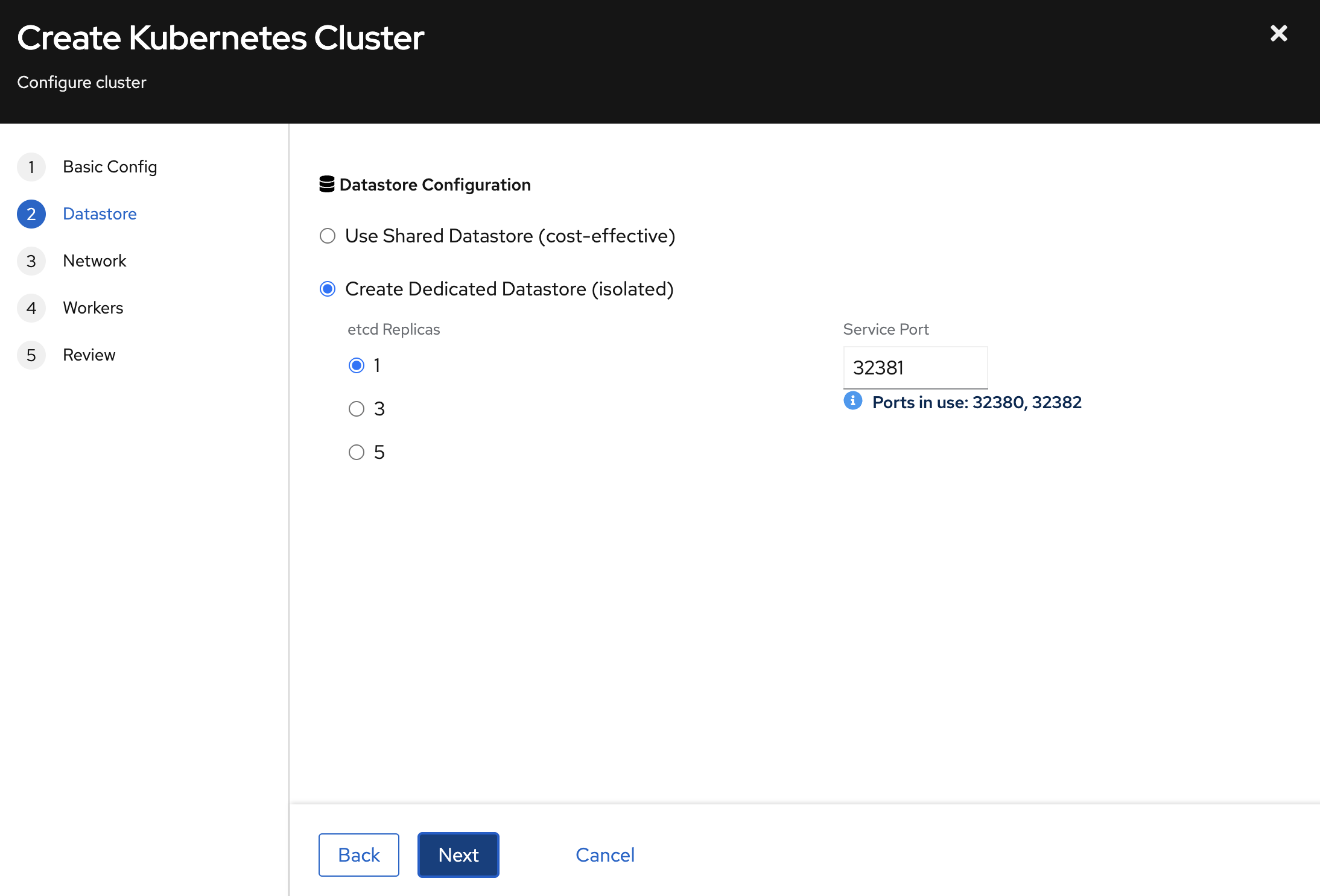
Choose how the Managed Cluster's etcd state is stored:
| Mode | Description | Best For |
|---|---|---|
| Shared Datastore (cost-effective) | Multiple Managed Clusters use an existing shared etcd datastore | Development, staging |
| Dedicated Datastore (isolated) | The Managed Cluster gets its own etcd datastore | Production workloads |
For dedicated datastores:
- etcd Replicas:
1for development,3for production high availability, or5for maximum redundancy.
The console allocates the dedicated datastore service port automatically from the free range 32380–32499; it is not a user setting. The Managed Cluster reaches etcd members over DNS on port 2379.
Step 3: Network & add-ons
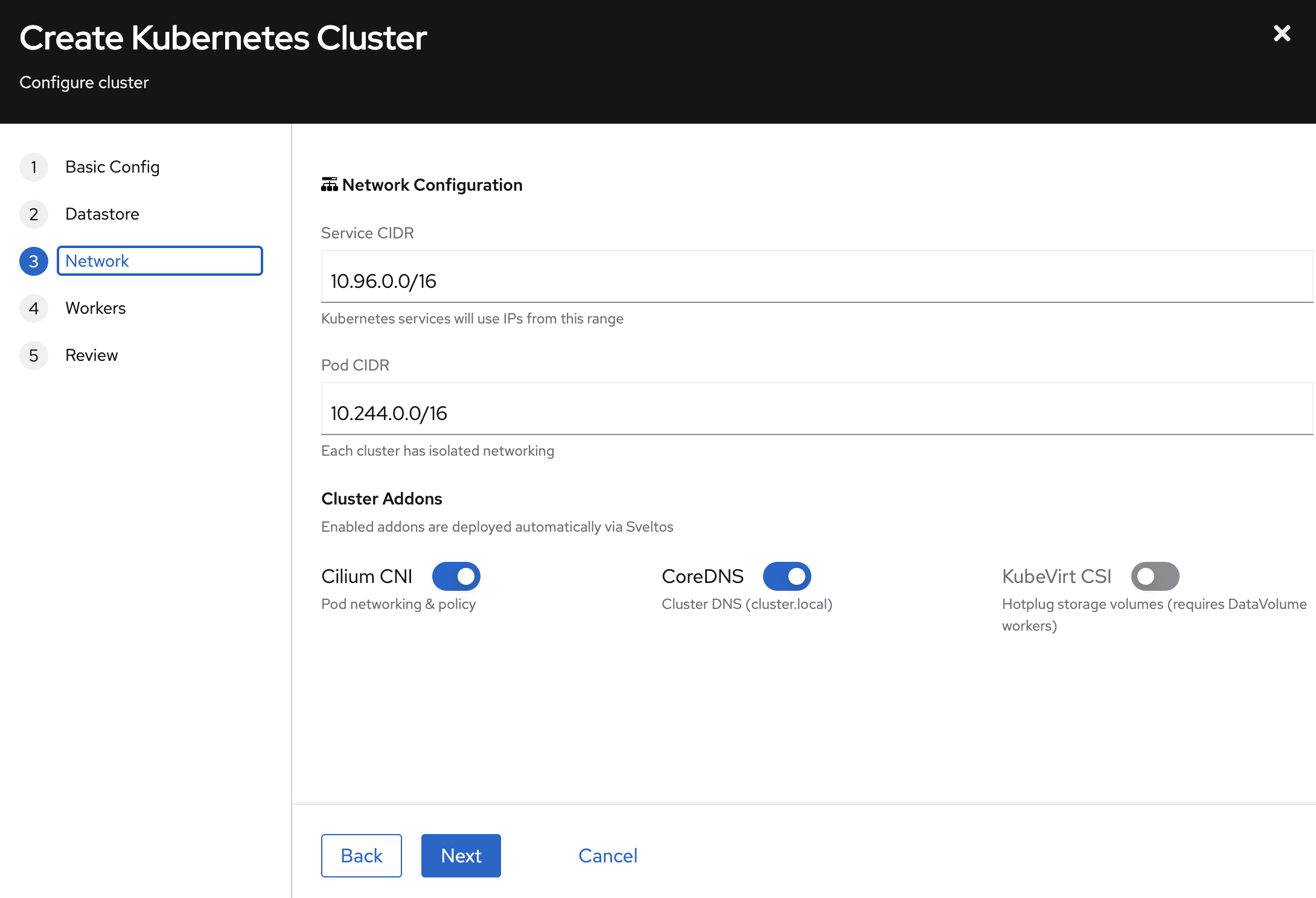
- Service CIDR: IP range for Kubernetes Services (default:
10.96.0.0/16). Each cluster has isolated networking. - Pod CIDR: IP range for Pods (default:
10.244.0.0/16).
Cluster add-ons deployed automatically:
| Add-on | Description | Recommended |
|---|---|---|
| Cilium CNI | Pod networking and network policy | Yes (required) |
| CoreDNS | Cluster DNS (cluster.local) | Yes (required) |
| Provider CSI | Persistent storage; KubeVirt uses hotplug DataVolumes | Enable for stateful workloads |
Step 4: Worker pools
Define one or more worker pools. Each pool is a group of identically configured VMs:
- Pool Name: Identifier (for example,
workers). - Replicas: Number of worker VMs.
- CPU Cores and Memory (GB): the resources for each worker.
- Worker Type:
DataVolume (Persistent)provides root disks that survive VM restarts. - Container Image: OS image for worker VMs (for example,
Ubuntu 24.04 + K8s v1.35.2).
Click Add Pool to add pools with different configurations (for example, a general pool and a high-memory pool).
Step 5: Review and create
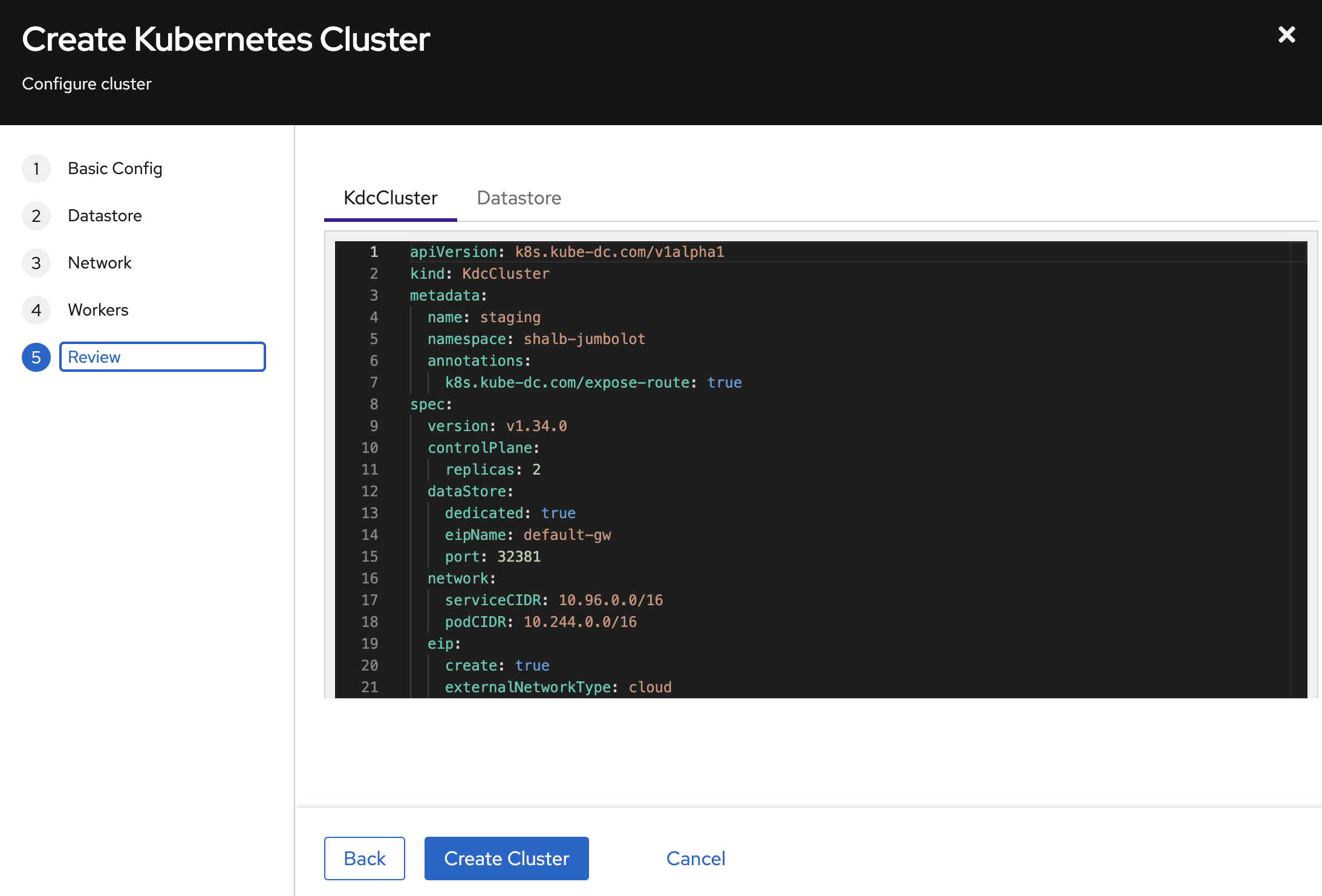
The Review step shows the exact YAML manifests that will be applied. Inspect both the KdcCluster and Datastore tabs to verify the configuration.
Click Create Cluster to start provisioning the Managed Cluster.
Create a Managed Cluster with kubectl
Apply a KdcCluster resource to your Project's backing namespace:
apiVersion: k8s.kube-dc.com/v1alpha1
kind: KdcCluster
metadata:
  name: dev
  namespace: acme-production
  annotations:
    k8s.kube-dc.com/expose-route: "true"
spec:
  version: v1.36.1
  controlPlane:
    replicas: 1
  dataStore:
    dedicated: true
    eipName: default-gw
    port: 32381
  network:
    serviceCIDR: 10.96.0.0/16
    podCIDR: 10.244.0.0/16
  eip:
    create: true
    externalNetworkType: cloud
  enableClusterAPI: true
  workers:
    - name: workers
      replicas: 3
      cpuCores: 2
      memory: 8Gi
      diskSize: 30Gi
      image: docker.io/shalb/ubuntu-2404-container-disk:v1.36.1
      architecture: amd64
      infrastructureProvider: kubevirt
      storageType: datavolume
kubectl apply -f cluster.yaml
Spec reference
| Field | Description | Default |
|---|---|---|
spec.version | Kubernetes version | Required |
spec.controlPlane.replicas | API server replicas (1–5) | 2 |
spec.dataStore.dedicated | Create dedicated etcd | false |
spec.dataStore.eipName | EIP for datastore LoadBalancer | default-gw |
spec.dataStore.port | Optional dedicated datastore service port; it must be unique on the selected EIP. The console allocates 32380–32499; the API defaults to 2379 when omitted. | 2379 |
spec.network.serviceCIDR | Kubernetes service CIDR | 10.96.0.0/12 |
spec.network.podCIDR | Pod network CIDR | 10.244.0.0/16 |
spec.eip.create | Auto-create EIP for API server | true |
spec.eip.externalNetworkType | cloud or public | public |
spec.enableClusterAPI | Enable Cluster API worker management | false |
spec.workers[].name | Worker pool name (unique) | Required |
spec.workers[].replicas | Number of workers in pool | 2 |
spec.workers[].cpuCores | CPU cores per worker | 1 |
spec.workers[].memory | Memory per worker | 2Gi |
spec.workers[].image | KubeVirt worker image; choose one compatible with spec.version | Platform default |
spec.workers[].storageType | datavolume (persistent) or containerdisk (ephemeral) | datavolume |
spec.workers[].infrastructureProvider | kubevirt or cloudsigma | kubevirt |
spec.loadBalancer.blocks | Number of /28 blocks (16 VIPs each) for project-internal LoadBalancer VIPs (1–8; KubeVirt clusters, where the platform enables VIP pools) | 1 |
spec.encryption.etcd.enabled | Encrypt selected API data at rest in the cluster's etcd (Secrets by default) (KMS v2 envelope through OpenBao Transit). See Encryption at rest | false |
spec.encryption.etcd.kekRotation.enabled | Auto-rotate the Key Encryption Key on a schedule | false |
spec.encryption.etcd.kekRotation.interval | Duration between rotations. The units are d, h, m, and s; w is not accepted. Must be at least 7d, and at least spec.backup.retentionDays. | None |
Annotations
| Annotation | Description |
|---|---|
k8s.kube-dc.com/expose-route: "true" | Expose API endpoint externally through TLSRoute (recommended for cloud network type) |
kube-dc.com/restore-from | Selects a snapshot for a disruptive restore of an existing Managed Cluster. Adding it starts the restore workflow; it is not a first-boot option. Plaintext .db keys and envelope directories are detected automatically. Use the cluster detail view's danger zone and read Backups and Recovery before restoring. |
Encryption at rest
Your cluster's etcd stores everything kubectl returns, including Secrets,
ConfigMaps, CRDs, ServiceAccount tokens. By default these are written
to disk in plaintext. Flipping a single field encrypts them with
KMS v2 envelope encryption: each row gets a fresh AES-256-GCM data
key (DEK), and the DEK is wrapped by a per-cluster Key Encryption Key
(KEK) that lives in Kube-DC's OpenBao Transit engine and never leaves
in plaintext.
spec:
  encryption:
    etcd:
      enabled: true
That setting enables the default encryption flow: a
per-cluster KMSKey is auto-created, the apiserver starts with a KMS
plugin sidecar, and every new Secret you create from that point on is
stored encrypted. Existing Secrets are re-encrypted on their next update. Do not use a delete-and-recreate sweep: it can rotate generated metadata, interrupt controllers, and remove resources between operations. Plan a controlled maintenance workflow with your platform operator when existing data must be rewritten immediately.
To check it took effect:
kubectl get kdccluster <name> -o jsonpath='{.status.encryption}'
You should see a resolvedKeyRef (the name of the auto-created KMSKey)
and kekRotation.currentVersion: 1.
Rotate the KEK
Encryption at rest by itself does not rotate the wrapping key. schedule that explicitly:
spec:
  encryption:
    etcd:
      enabled: true
      kekRotation:
        enabled: true
        interval: 90d
Rules:
- Units are
d,h,m,s(now). - Minimum 7 days, maximum 730 days.
- Interval must be ≥
spec.backup.retentionDays * 24h. The rationale: rotating faster than backups age out leaves historic backups bound to key versions you'd have to manage by hand.
Rotation creates a new Transit key version. Old key versions stay alive, and historic Secrets and backups stay decryptable indefinitely. Bulk re-wrap of existing rows is not done automatically (each row re-wraps on next Update); a CLI-driven sweep is planned for a future release.
Status:
kubectl get kdccluster <name> -o jsonpath='{.status.encryption.kekRotation}'
# {"currentVersion":2,"enabled":true,"lastRotatedTime":"...","minDecryptionVersion":1,"nextRotationTime":"..."}
Backups stay encrypted too
When encryption.etcd.enabled: true, spec.backup.enabled: true, and the
platform's managed backup bucket is available, the per-cluster snapshot CronJob
writes envelope-encrypted snapshots to S3 as three sibling objects. Enabling the
field alone does not provision object storage; confirm the Managed Cluster's
backup status on each installation.
See Backups and snapshots. Restoring an encrypted snapshot also requires OpenBao access, so possession of the S3 objects is not sufficient to decrypt them.
Limits
- What's encrypted:
Secretvalues by default. Opt intoConfigMaptoo throughspec.encryption.etcd.resources: ["secrets", "configmaps"]. Other resources (leases,events,endpoints,pods) stay plaintext for the high-write-rate / low-sensitivity reasons. See the design document on the public site. - What's NOT encrypted: application data on PVCs. Use a workload- side mechanism (LUKS-backed StorageClass, application encryption, Velero with restic) for that.
- Disabling: flipping
enabled: falseon a cluster that was previously encrypted is blocked by design, because the apiserver would fail to read existing rows. Contact your cluster admin for the documented two-step migration.
Monitor Managed Cluster creation
# Watch cluster status
kubectl get kdccluster -n acme-production -w

# Example output:
# NAME   VERSION   PHASE   ENDPOINT                                        DATASTORE   AGE
# dev    v1.35.0   Ready   https://dev-cp-acme-production.kube-dc.cloud:443     dev-etcd    5m

# Check datastore status
kubectl get kdcclusterdatastores -n acme-production

# Example output:
# NAME       READY   DEDICATED   DATASTORE   AGE
# dev-etcd   Ready   true        dev-etcd    5m
Provisioning time depends on worker capacity, image availability, and networking. The cluster moves through these phases: Pending → WaitingForService → Provisioning → Ready.
Access the Managed Cluster
In the console
After the Managed Cluster is Ready, use Kubeconfig on its detail page to download the kubeconfig file.
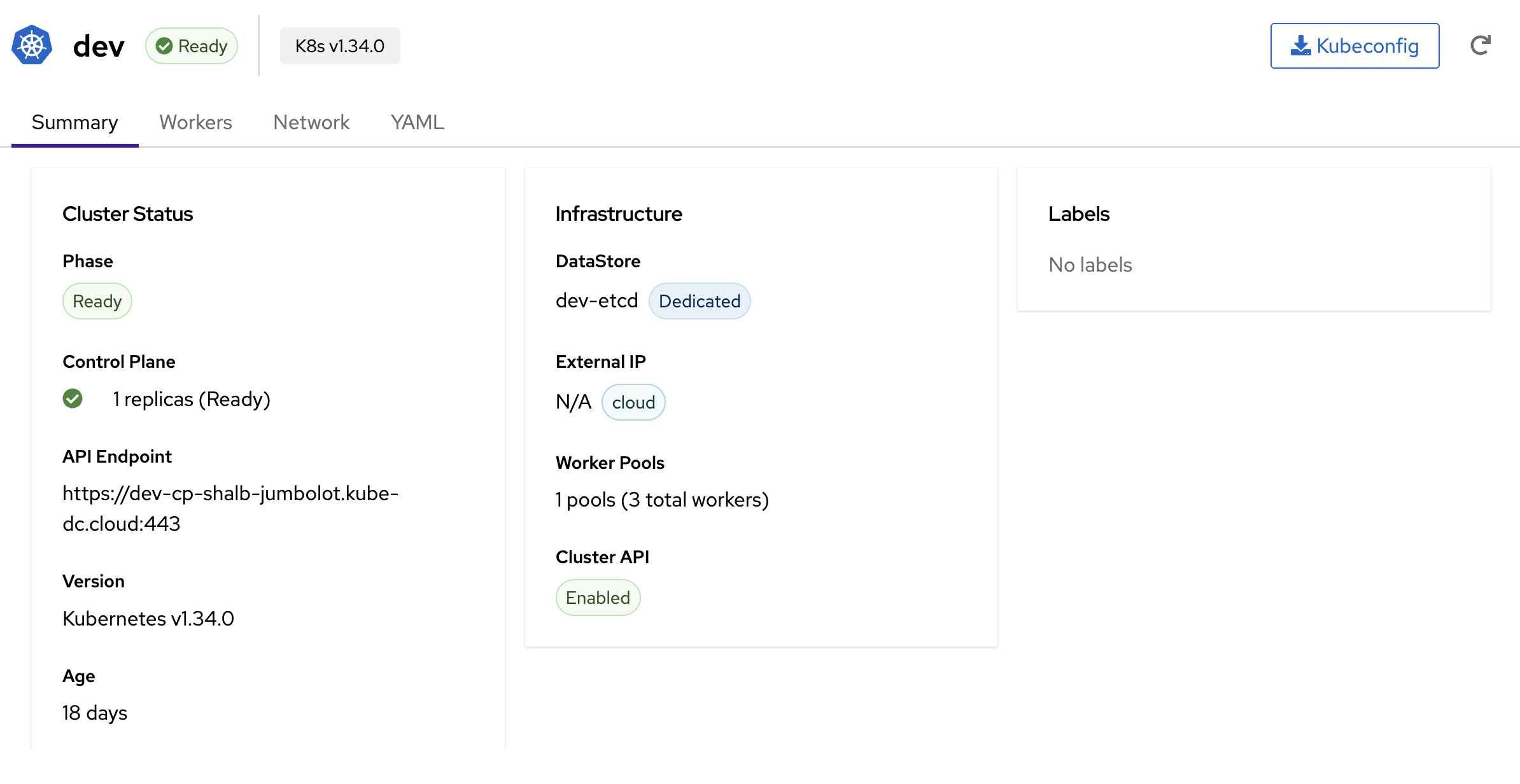
The cluster detail page shows:
- Phase: Current state (Ready)
- Control Plane: Replicas and health status
- API Endpoint: The external URL (for example,
https://dev-cp-acme-production.kube-dc.cloud:443) - DataStore: etcd name and type (Shared/Dedicated)
- Worker Pools: Number of pools and total workers
- Tabs for Summary, Workers, Network, and YAML views
With kubectl
Use the Kubeconfig action in the cluster detail view. For a cluster with an external API endpoint, the equivalent Project-level command reads the generated external kubeconfig:
kubectl get secret dev-cp-admin-kubeconfig-external -n acme-production \
  -o jsonpath='{.data.admin\.conf}' | base64 -d > /tmp/dev-kubeconfig

kubectl --kubeconfig=/tmp/dev-kubeconfig get nodes
If the external Secret does not exist, the cluster API is private. Its internal kubeconfig is intended for clients with connectivity to the platform network; enable the external API endpoint or use an approved private access path before downloading it to a workstation.
Managed Cluster infrastructure
When you create a Managed Cluster, its KdcCluster and related infrastructure resources are provisioned automatically in the Project's backing namespace:
| Resource | Name Pattern | Purpose |
|---|---|---|
Service (LoadBalancer) | {cluster}-cp | API server endpoint |
Service (ClusterIP) | {cluster}-cp-ext | External DNS endpoint |
TenantControlPlane | {cluster}-cp | Kamaji control plane pods |
KdcClusterDatastore | {cluster}-etcd | etcd (if dedicated) |
StatefulSet | {cluster}-etcd-etcd | etcd pods |
Service (LoadBalancer) | {cluster}-etcd-etcd-lb | etcd external access |
Cluster (CAPI) | {cluster} | Cluster API cluster object |
MachineDeployment | {cluster}-{pool} | Worker pool VMs |
Deployment | kccm-{cluster} or csccm-{cluster} | Provider Cloud Controller Manager |
The following example shows the Services created for cluster dev in the acme-production backing namespace:
$ kubectl get svc -n acme-production | grep dev
dev-cp                  LoadBalancer   10.101.79.219    100.65.0.148   6443/TCP    18d
dev-cp-ext              ClusterIP      None             <none>         6443/TCP    18d
dev-etcd-etcd           ClusterIP      None             <none>         2379/TCP    18d
dev-etcd-etcd-lb        LoadBalancer   10.101.20.207    100.65.0.115   32382/TCP   18d
dev-etcd-etcd-lb-ext    ClusterIP      None             <none>         32382/TCP   18d
Next steps
- Cluster management: Exposing services, persistent storage, scaling, and operations
- CLI and kubeconfig access